
If your client testimonials are scattered across Google reviews, emails, Instagram DMs, and screenshots, here’s how to organize testimonials in ClickUp and create a simple testimonial management system you’ll actually use.
I recently attended a Made for Mothers Masterclass all about testimonials: how to collect them, where to use them, and how to make the most of them once you have them.
Of course, my operations brain immediately went to:
But how are we organizing all of these testimonials?!
Because testimonials tend to be an afterthought.
You get the sweetest DM from a client. Someone leaves you a five-star Google review. A client sends a Slack message that makes you tear up a little.
You think, I need to save that.
And then six months later you’re writing a sales page, KNOW you have the perfect testimonial somewhere, and suddenly you’re scrolling through old messages trying to remember who said the nice thing.
We can do better.
How to Organize Client Testimonials in ClickUp
I’m going to start by saying this system can work in almost any project management tool.
But my heart belongs to ClickUp, if you didn’t already know.
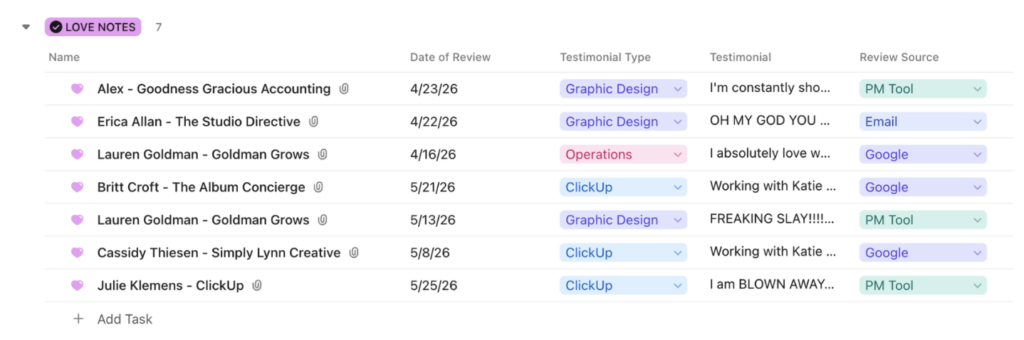
I have one list in ClickUp called Love Notes.
Every testimonial gets its own task or row, which means every nice thing a client has ever said about working with me has ONE home.
No searching Slack.
No digging through my inbox.
No trying to remember if someone sent the testimonial through Google, Instagram, or carrier pigeon.
I know exactly where to look. And that’s the point.
How to Create a Testimonial Tracking System in ClickUp
My Love Notes list is super simple, but I’ve added enough information that I can easily find the right testimonial when I need it.
For each testimonial, I track:
- Name + Company: Who said it
- Date of Review: So I know how recent the testimonial is
- Testimonial Type: The service or category the feedback relates to
- Testimonial: The actual review text
- Review Source: Google, email, Instagram, Slack, a PM tool, etc.
- Original Screenshot: Attached directly to the task
For my business, my testimonial types include things like Graphic Design, Operations, ClickUp, and Other.
Your categories should match your services.
That little field becomes VERY useful when you need a testimonial for something specific.
Writing a ClickUp sales page? Filter for ClickUp testimonials.
Updating your operations services page? Filter for Operations.
Creating graphics for a specific offer? You already know exactly where to look.
What to Include in Your ClickUp Testimonial List
This might actually be my favorite part of the system.
If I’m in the middle of a chaotic day and someone sends me a nice message, I do NOT need to stop what I’m doing, figure out the category, paste the text, add the date, and make everything pretty.
I just need to save it.
Screenshot it.
Drop it into my Love Notes list as a To Do.
Move on with my day. I can clean it up later.
Because a slightly messy testimonial sitting in the correct place is much more useful than a perfectly formatted testimonial I can’t find six months from now.
How to Collect and Manage Client Testimonials
Once you have a place to store your testimonials, the next question is:
How are they getting there?
If your entire testimonial strategy depends on remembering to ask clients whenever it happens to cross your mind, we need another system.
Depending on your business, that could mean building the request into your month-end close process, adding it to your client offboarding workflow, or creating an automation in your CRM that sends a testimonial request when a project wraps up.
You could even add a recurring task for yourself to review recent client wins and determine who it makes sense to request feedback from.
The goal is to create a repeatable process:
Ask for the testimonial → receive it → save it → organize it → USE IT.
Because collecting incredible client feedback and then letting it disappear into your inbox is not helping anyone.
How to Use ClickUp to Manage Client Reviews and Testimonials
You don’t need to recreate my exact ClickUp setup.
Start by deciding where your testimonials will live.
Then think about the information you typically need when you go looking for one.
Maybe you need to know which service the client purchased. Maybe you want to categorize them by industry. Maybe you need to know whether you have permission to use their name, photo, or company.
Build around how you actually use testimonials in your business.
That is something I say about ClickUp ALL THE TIME.
Your systems should support the way your business works, not force your business into someone else’s setup.
One Action Item You Can Implement Today
Take 15 to 20 minutes today and create one home for your “Love Notes.”
It can be a list in your PM tool, a spreadsheet, a document, or even a folder on your computer for now.
Just pick ONE place.
Then find the most recent nice thing a client said about working with you and put it there.
Even if it isn’t formatted.
Even if all you have is a screenshot.
Then, from this point forward, every testimonial goes into that same place.
Once you have the habit down, you can start adding categories, dates, sources, automations, and all the other fun ops stuff.
But first?
Give your nice words a home.
Future you, frantically looking for a testimonial while updating a sales page, will be VERY grateful.
A Resource for Fellow CEO Moms
Speaking of the Made for Mothers Masterclass that sent my brain down this testimonial organization rabbit hole...
If you’re a mom running a business and looking for actual relationships, referrals, and a community of women who understand both sides of that equation, Made for Mothers has become one of my favorite business communities.
I’ve been part of the community for over a year, and it includes monthly hot seat coaching, mastermind calls, member-led coffee chats, a private community, referral and collaboration opportunities, and PR/promotion opportunities.
Basically, it’s a room full of women building businesses while also dealing with the very normal realities of motherhood.
Which is exactly why I love it.
Join Made for Mothers →
Affiliate note: This is my affiliate link, which means I may receive a commission if you join through my link. I only share resources and communities I genuinely use and recommend.
Want Help Organizing Your Business in ClickUp?
A testimonial tracker might be one tiny piece of your operations.
But these are exactly the little systems that start adding up.
Your client onboarding process. Lead tracking. SOPs. Recurring tasks. Team workflows. Testimonials. All of the information currently living in your head because you haven’t figured out where else it should go.
That’s where I come in.
Whether you need help fixing an existing ClickUp workspace or building a process that actually fits the way your business runs, I offer ClickUp support ranging from audits and individual process builds to complete workspace setups.