

If you follow me on Threads, you already know I will not shut up about ClickUp. (If not, you can follow me here and read all my threads about it).
When I first started as an OBM, I was fully on team “learn every platform so I can help everyone.” Monday, Asana, Trello, ClickUp… if it existed, I wanted to master it.
But after a few years (and realistically, life with an 8 and 5 year old with nonstop sports and activities), I realized there was absolutely no way I could confidently lead clients through implementation and optimization on every single platform.
So, I leaned all the way into ClickUp.
And after years of testing different workflows, dashboards, and task management setups, I landed on ONE list that I genuinely could not function without.
Inside ClickUp, it is labeled “Client Deliverables.”
Personally? I call it my Mega Monster List.
Why I Needed One Centralized Task List
As an OBM, my work lives in a lot of different places.
Some clients are in my ClickUp workspace.
Some are in their own accounts.
Others are in Monday.
A few do not even use a project management tool. (No shame, I promise!)
At one point, I realized I was trying to mentally manage work across way too many systems, and my brain was exhausted. I did not need 20 different lists driving my week.
I needed ONE place that showed me everything.
Every deliverable, deadline, delegated task and every client. So I built one master list that allows me to see my entire workload in one place without bouncing between platforms all day long.
The ClickUp Setup I Use Every Week
The list itself is honestly pretty simple, but the custom fields are what make it powerful.
Here are the fields I use inside my Client Deliverables list:
- SOP Link
- Approval Needed? (Y/N)
- Assignee
- Client
- Frequency
- Brain Space
These fields allow me to quickly sort and organize my work based on:
- Tasks due this week by client
- Tasks due by day
- Delegated work assigned to contractors
- Approval status
- Recurring deliverables
- The type of mental energy required to complete the task
That last one — Brain Space — has been a huge game changer for me.
Because not all tasks require the same level of focus.
Some tasks need deep work and creativity. Others are quick admin tasks I can knock out between meetings or baseball practice.
Being able to group work based on mental energy instead of just deadlines has helped me structure my weeks so much more intentionally.
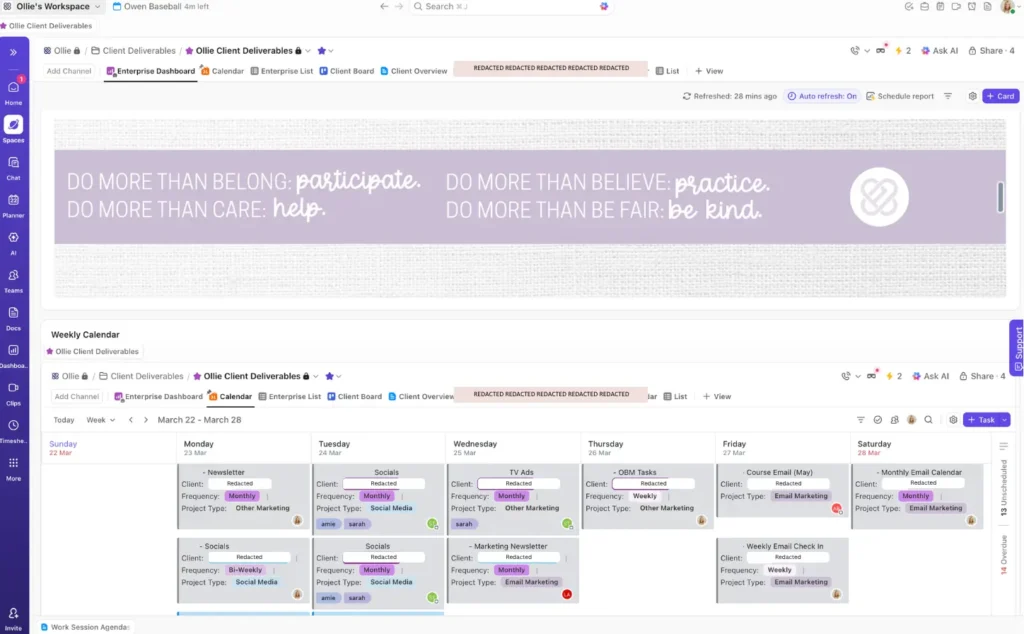
How I Plan My Week as an OBM
Every Friday, I review the following week inside my dashboard and start organizing my calendar.
Sometimes I block my schedule by client and other times I block it by task type or brain space.
I also have my ClickUp calendar connected directly to my actual calendar so I can see everything together in one place.
From there, I:
- Delegate what I can
- Prioritize what needs my attention first
- Look realistically at my workload capacity
- Communicate early if timelines need to shift
And this part is important: I do not wait until something is overdue to communicate with clients.
I do it before they even have a chance to wonder about it. Over communication is one of the best skills an OBM or VA can develop.
The Biggest Takeaway (Even If You Don’t Use ClickUp)
You need ONE place where everything lives.
I genuinely do not care if that is ClickUp, Excel, a whiteboard or a giant sticky note on your wall.
But if your tasks are scattered across notebooks, Slack messages, emails, screenshots, and random sticky notes, your brain will never fully rest.
Your system does not need to be complicated. It just needs to give you visibility.
Because once you can see everything clearly, you can actually manage your workload proactively instead of constantly reacting to it.
A Simple ClickUp Tip That Makes Reporting Easier
If you use ClickUp and want to track workload by client, create a custom field called “Client” even if each client already has their own folder or list.
I know it feels redundant.
But once you start building dashboards and reports, that field allows you to quickly pull:
- Tasks by client
- Contractor workload
- Due dates
- Deliverable volume
- Capacity trends
It makes high-level planning so much easier.
Not Ready for ClickUp? Start With Excel!
Honestly, this same concept can work in Excel too. You can build a master task list with:
- Due dates
- Clients
- Statuses
- Priority levels
- Delegation tracking
Then use pivot tables or filters to organize your week.
The tool matters less than the visibility.
Need Help Cleaning Up Your ClickUp Setup?
If your ClickUp workspace feels overwhelming, cluttered, overcomplicated, or like it is no longer working for your business, my ClickUp Audit service was built for exactly that.
(Quick overview) Inside the audit, I review:
- Your current setup
- Spaces, folders, lists, and views
- Workflow bottlenecks
- Task flow issues
- Automations
- Statuses
- Custom fields
You will receive:
- Recommendations for simplification and optimization
- Suggestions to reduce manual work
- Answers to your “is this set up right?” questions
- A prioritized action plan with next steps
- Optional Loom-style examples for implementation guidance
ClickUp Audit
Timeline: 2–3 weeks, Investment: $975
If you are spending more time managing your ClickUp than actually using it, this is your sign to simplify it.